SMS Automations
Reply, forward and capture contacts automatically when someone texts your number
Included free with every account
✓ 50 FREE SMS credits included when you sign up


What Are SMS Automations?
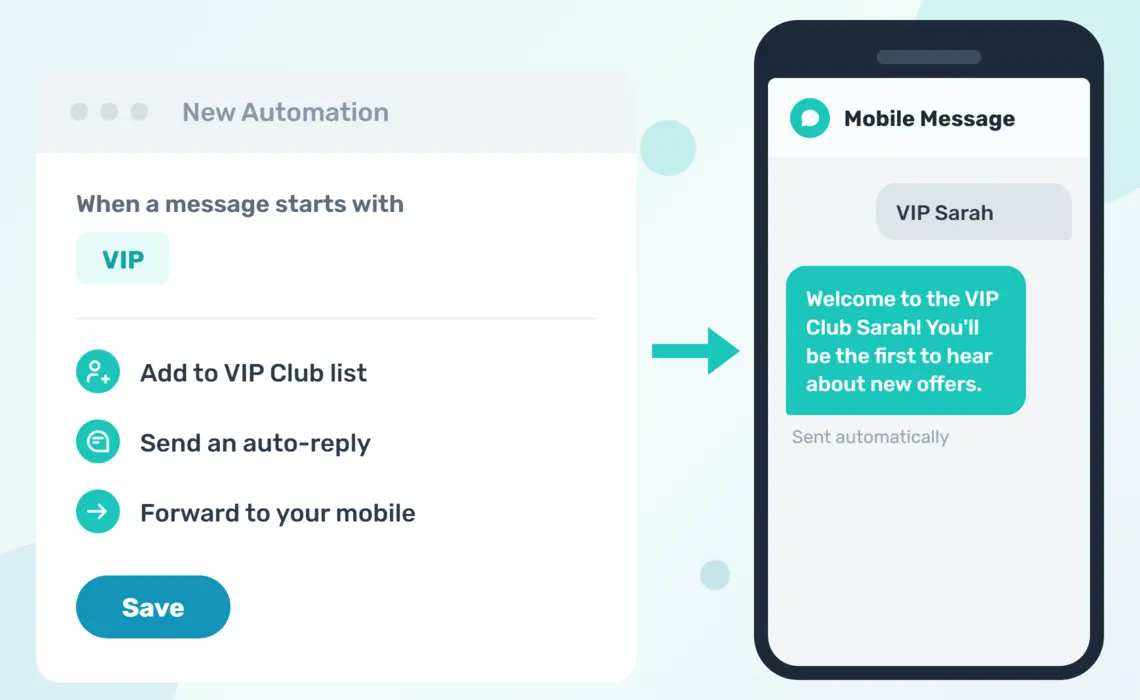
SMS automations decide what happens when someone texts one of your numbers. You pick a trigger, either every inbound message or a keyword like VIP or BOOK, then add the actions you want us to run. We can reply automatically, add the sender to a contact list, forward the message to your mobile or email, or send it straight to your own systems.
Automations are included with every Mobile Message account at no extra cost. Receiving messages is free, and any messages your automations send simply use your normal SMS credits. Everything is set up in a couple of clicks from your dashboard, with a built-in tester so you can check exactly what an incoming message will do before it goes live.
Popular Automations Our Customers Set Up

Keyword Sign Ups
Tell customers to text VIP to your number to join your list. The automation adds them to a contact list, captures their name from the message, and sends a welcome reply, all without you lifting a finger.

After Hours Auto Replies
Set an automation that only runs outside business hours. When someone texts you at 9pm, they instantly get a reply letting them know when you'll be back, so no enquiry feels ignored.

Forward Messages to Your Team
Forward incoming SMS to up to 5 mobile numbers, or to email addresses, so replies reach the right person straight away. Each of your numbers can forward to a different team member.

Competition and Event Entries
Run a text-to-win competition or event RSVP. Entrants text a keyword plus their name, and the automation saves them as a contact, adds them to the entry list, and confirms their entry by reply.

Your Own Opt-Out and Opt-In Keywords
STOP always works, and you can add your own keywords on top. Treat CANCEL or END as an opt out with a confirmation reply, or let people re-subscribe by texting START or JOIN.

Send Messages to Your Systems
Post incoming messages to a webhook the moment they arrive, or forward them into your 3CX phone system. Route each dedicated number to a different endpoint for multi-department setups.
Example: Text VIP to Join
Say you print "Text VIP to 0480 123 456 for early access to sales" on your receipts and in-store signage. You create one automation with the trigger "message starts with VIP" and three actions. Here's what happens when a customer texts in.
The customer sends
VIP Sarah Jones
The automation instantly
1. Saves Sarah as a contact, with her name captured from the message.
2. Adds her to your VIP Club contact list.
3. Replies with your welcome message.
Sarah receives
Welcome to the VIP Club Sarah! You'll be the first to hear about new offers. Reply STOP to opt out.
Next time you message the VIP Club list, Sarah is included automatically, and personalisation tags like {first_name} just work.
Getting Started with SMS Automations
1Create Your Free Account
Sign up in about 2 minutes and you'll get 50 free SMS credits to test with. A free dedicated number is available after your first purchase of SMS credits, giving you your own number for customers to text.
2Build Your First Automation
Open Automations in your dashboard and click "New automation". Pick a trigger, add your actions, and save. You can stack multiple actions on one automation, and run different automations on different numbers. For a full walkthrough of every trigger and action, see the automations help article.
3Test It Before It Goes Live
Use the built-in tester to type an example message and see exactly which automations would run and what each one would do. No messages are sent and nothing is saved, so you can experiment freely. Every automation also keeps a log, so you can see what ran and when.
Ready to Try Mobile Message?
Our sign-up process takes just 2 minutes and gives you instant access to SMS automations. You can set up your first auto reply today!